


🎯
Who it's for
Developers, content creators, founders, marketers, and students who want a trustworthy, current reference in their own language.
Everything you need to learn SEO from zero — and a reference you'll keep coming back to.
SEO is how you help the right people find your website through search engines and, increasingly, AI assistants. This guide explains the foundations, the tactics, and the tools — with copy-paste snippets and free, open-source software at every step.
Search Engine Optimization (SEO) is the practice of helping people find your website through search engines like Google and Bing — and, increasingly, AI assistants. This guide takes you from absolute zero to a confident, modern practitioner.
SEO means earning visibility in unpaid (organic) search results by making your pages relevant, trustworthy, technically sound, and genuinely useful. Done well, it brings a compounding stream of visitors who are actively looking for what you offer — without paying per click.
Developers, content creators, founders, marketers, and students who want a trustworthy, current reference in their own language.
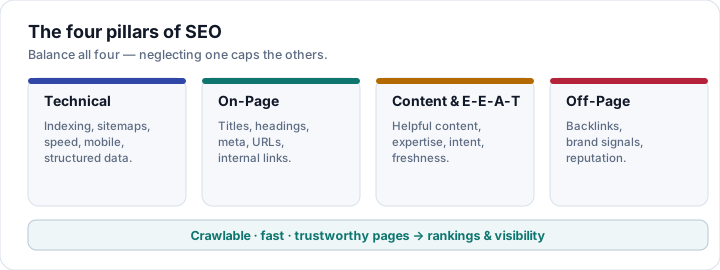
The four pillars — technical, on-page, content/E-E-A-T, and off-page — plus measurement, AI search, and the tools that make it practical.
Read top-to-bottom to learn, or jump around with the sidebar. Every snippet has a copy button; the whole guide prints cleanly to PDF.
Tip. New to SEO? Read in order. Need a reference? Use the sidebar or your browser's find (Ctrl/Cmd + F). This guide is free and open-source — see how to contribute at the end.
This is a companion to the open guides GEO Basics (optimizing for AI answer engines) and Dublin Core Basics (metadata). SEO is the foundation all of them build on.
You can't optimize what you don't understand. Almost every SEO tactic maps back to one of four stages: crawl, index, rank, and serve.
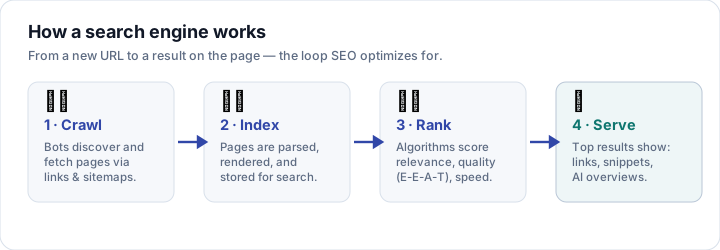
Bots (Google uses Googlebot) discover URLs by following links and reading your
XML sitemap. Large sites have a practical crawl budget, so a clean
internal-linking structure and a robots.txt that doesn't waste crawls on junk pages both matter.
Google parses each page, renders it (executing JavaScript), and stores it in the index.
Not everything crawled gets indexed: thin, duplicate, or blocked pages may be skipped. Use
canonical tags to consolidate duplicates and noindex to keep
low-value pages out.
For each query, algorithms weigh hundreds of signals: relevance to the search, content helpfulness and E-E-A-T, links, page experience, freshness, and the user's language and location. There is no fixed formula, and it changes constantly.
The best results are returned as blue links, rich results, featured snippets, and AI Overviews. Because Google renders JavaScript, client-side-only content can be slower and riskier to index — prefer server-rendered or static HTML for anything that must rank.
Mental model. Make every important page easy to crawl, easy to understand, and clearly worth ranking. The rest of this guide is just detail on those three ideas.
Keywords are the words people type. Intent is what they actually want. Match both and you're halfway to ranking.
| Intent | The user wants to… | Example query |
|---|---|---|
| Informational | Learn something | “what is hreflang” |
| Navigational | Reach a specific site/page | “search console login” |
| Commercial | Compare before buying | “best free seo tools” |
| Transactional | Do or buy something now | “hire seo consultant” |
Identify the dominant intent for a keyword by looking at what already ranks. If page one is all tutorials, Google has decided the intent is informational — a product page won't break in.
Weigh search volume against difficulty and, most of all, intent match. Favor long-tail keywords (longer, specific phrases) early on — they're easier to win and convert better. Group related keywords into topic clusters: one in-depth pillar page linking to focused sub-pages. This builds topical authority and a clean internal-link structure.
Rule of thumb. Write one page per intent, not per keyword variation. Optimize for the question behind the words.
On-page SEO is everything you control inside the page itself: the words, the HTML, and the structure that tell both people and search engines what the page is about.
The <title> is what shows as the clickable headline in results and the browser tab.
Keep it roughly 50–60 characters, put the primary keyword near the front, make it
compelling, and keep it unique per page. Include your brand at the end.
Not a ranking factor, but it strongly affects click-through rate. Write ~150–160 persuasive characters that include the keyword (it gets bolded) and a reason to click. Google may rewrite it, so treat it as a strong suggestion, not a guarantee.
Use exactly one <h1> for the page topic, then logical <h2> and
<h3> levels. Don't skip levels and don't choose headings for their size — they
describe structure, which screen readers and search engines both rely on.
Answer the searcher's question thoroughly and originally. Cover the topic, not just the keyword: related questions, examples, and the next step. Make it scannable with short paragraphs, lists, and descriptive subheadings.
/seo/on-page beats /p?id=812.One page, one job. Each URL should target one clear topic and intent, with one title and one H1. Copy-paste the full optimized <head> from Snippets.
Technical SEO makes sure engines can crawl, render, and index your site without friction — and that the right version of each page is the one that ranks.
List your canonical, indexable URLs in a sitemap.xml, keep lastmod accurate, and submit it in Search Console. It's a discovery aid, not a ranking lever — don't list redirects, error pages, or noindex URLs.
Controls crawling, not indexing. Allow the resources (CSS/JS) Google needs to render your pages, block genuinely useless paths, and reference your sitemap. Grab a ready template from Snippets.
When the same content lives at multiple URLs (parameters, http/https, trailing slashes), a <link rel="canonical"> tells Google which one to index. The preferred page should reference itself.
Use 301 for permanent moves (passes signals) and 302 for temporary ones. Avoid redirect chains and loops — each hop wastes crawl budget and link equity.
Careful. A robots.txt Disallow is not the same as noindex. A blocked URL can still be indexed (without its content) if it's linked. To remove a page from the index, allow crawling and add a noindex robots meta tag.
Structured data is a shared vocabulary (Schema.org) you add to pages so search engines understand them precisely — and can show rich results.
The recommended format is JSON-LD: a <script type="application/ld+json">
block, far easier to maintain than inline Microdata or RDFa. Mark up content that is actually visible
on the page, and follow Google's structured-data guidelines.
Article, BlogPosting, FAQPage, HowTo, BreadcrumbList, VideoObject.
Organization, LocalBusiness, Product, Review / AggregateRating, Event.
Structured data can earn rich results — star ratings, FAQ drop-downs, breadcrumbs, prices, recipe cards — that take up more space and lift click-through. It's not a direct ranking boost, but it helps engines (and AI answer systems) trust and reuse your content.
Meta moment. This very page ships Article, FAQPage, BreadcrumbList, and Organization JSON-LD. Grab the template in Snippets and validate it with the tools in Generators.
Speed and stability are part of ranking — and, more importantly, part of not losing visitors. Google measures three Core Web Vitals at the 75th percentile of real users.
| Metric | Measures | “Good” (2026) |
|---|---|---|
| LCP — Largest Contentful Paint | Loading: when the main content appears | ≤ 2.5 s |
| INP — Interaction to Next Paint | Responsiveness to taps/clicks (replaced FID in 2024) | ≤ 200 ms |
| CLS — Cumulative Layout Shift | Visual stability: unexpected movement | ≤ 0.1 |
preload it, and remove render-blocking CSS/JS.width/height (or aspect-ratio) on images and embeds, and reserve space for anything that loads late.Use PageSpeed Insights (real-field + lab data), Lighthouse, the web-vitals JavaScript library for real-user monitoring, and the Core Web Vitals report in Search Console. All are free — see Tools.
Practice what we preach. This guide is static HTML with minimal JavaScript, a system-font fallback, and explicitly sized images — so it stays fast and stable by default.
If you serve more than one language or country, hreflang tells Google which version to
show to whom — and stops your own translations from competing with each other.
en, pt-BR, es) and add x-default for a fallback.Roughly half of all Google searches are in languages other than English — multilingual SEO is opportunity, not overhead. Grab the ready hreflang block in Snippets.
| Structure | Example | Trade-off |
|---|---|---|
| Subdirectory recommended | example.com/es/ | Consolidates authority on one domain. Easiest to maintain. |
| ccTLD | example.es | Strongest geo-signal, but splits link authority across domains. |
| Subdomain | es.example.com | Middle ground; treated as somewhat separate. |
Have a native speaker review copy, do local keyword research (people search differently), and adapt currency, examples, and tone. Thin machine translation reads as low-quality and can be filtered.
Live example. This guide ships in English, Portuguese, and Spanish with reciprocal hreflang and x-default → English. Use the language switcher in the top bar to see it work.
Off-page SEO is what the rest of the web says about you. Links and brand mentions remain among the strongest signals of authority and trust.
A link is a vote of confidence. Quality and relevance beat quantity: one link from a respected, on-topic site is worth more than hundreds from low-quality directories. Links also help discovery and pass authority through your internal structure.
Aim for natural, varied anchor text. Mark paid or untrusted links with rel="sponsored" or
rel="nofollow", and user-generated links with rel="ugc".
Avoid. Buying links, private blog networks (PBNs), and mass directory spam are link schemes. Google devalues or penalizes manipulation. Only use the disavow tool for genuinely toxic, unnatural links you can't remove.
E-E-A-T — Experience, Expertise, Authoritativeness, Trustworthiness — is how Google's guidelines describe content worth ranking. In 2026 the first E, Experience, carries real weight.
E-E-A-T isn't a single score you can tweak; it's a lens raters and systems use to judge whether a page deserves trust. You earn it by demonstrating first-hand experience, real expertise, recognized authority, and trustworthiness through accuracy and transparency.
Write for humans first. Content that fully satisfies the searcher's intent — with specifics, examples, and the next step — is what Google's “helpful content” systems reward. Content written mainly to game rankings tends to get filtered.
AI-assisted content can rank — if a knowledgeable human reviews it for accuracy, adds original insight or data, and it genuinely helps the reader. Mass-produced, unreviewed AI filler is exactly what quality systems target.
Gut check. “Would I trust this page if I landed on it cold?” If not, add the author, the evidence, the date, and the first-hand detail only you can provide.
If you serve a place — a city, a neighborhood, a region — local SEO helps you show up in the map pack and “near me” searches.
Claim and fully complete your Google Business Profile: accurate categories, hours, service area, photos, and regular posts. It's the single biggest lever for local visibility.
The quantity, recency, average rating, and your responses to reviews all feed local ranking — and they're what convince humans to choose you.
LocalBusiness structured data with address, geo coordinates, hours, and telephone.Consistency wins. Google cross-checks your Business Profile, on-site LocalBusiness schema, and third-party citations. When they agree, it trusts your location data.
Images and video drive traffic and increasingly feed AI answers — and they make or break your performance scores. Optimize them deliberately.
red-running-shoes.webp, not IMG_8842.jpg.srcset and always set width/height to protect CLS.loading="lazy" — but never the LCP image.VideoObject structured data (title, description, thumbnail, upload date, duration).LCP gotcha. Don't lazy-load your hero/LCP image — it delays the very metric you're trying to improve. Mark it fetchpriority="high" or preload it instead.
AI Overviews, ChatGPT, Perplexity, and Copilot answer questions by reading the same web you optimize for SEO. Generative Engine Optimization (GEO) is SEO seen through that lens.
AI answer engines retrieve candidate pages, evaluate them, synthesize a response, and sometimes cite sources. The eligibility rules are the SEO rules you already know: be crawlable, helpful, well-structured, and trustworthy. AI search doesn't replace SEO — it raises the reward for doing it well.
No magic markup. Google states there's no special tag (or required llms.txt) that guarantees AI visibility — helpful, people-first content with sound SEO is the path. Go deeper in the dedicated GEO Basics guide ↗.
SEO without measurement is guessing. These free tools tell you what's indexed, what ranks, and what to fix — set them up before you optimize.
The source of truth: indexing & coverage, the Performance report (queries, clicks, CTR, average position), Core Web Vitals, URL inspection, and sitemap submission. Verify your site on day one.
Bing also powers some AI assistants. You get crawl insights, indexing, free keyword research, and backlink data.
Track organic traffic, engagement, and conversions. Open-source, privacy-respecting options include Plausible, Umami, Matomo, and GoatCounter — see Tools.
Start here. If you do one thing today, verify your site in Search Console and submit your sitemap. Everything else builds on that data.
Most SEO problems are self-inflicted. Here are the ones that quietly cost the most — and the manipulative tactics that get sites penalized.
noindex or robots.txt blocks on live pagesNot worth it. Black-hat tactics may work for a while, then a core or spam update erases the gains — and the trust. Sustainable SEO always wins the long game.
Production-ready building blocks. Click Copy, paste into your project, and swap the placeholder URLs and text. Prefer generating dynamically? See Libraries and Generators.
<!doctype html>
<html lang="en">
<head>
  <meta charset="utf-8">
  <meta name="viewport" content="width=device-width, initial-scale=1">
  <title>Page title — 50–60 characters with your keyword</title>
  <meta name="description" content="Compelling 150–160 character summary that earns the click.">
  <meta name="robots" content="index, follow">
  <link rel="canonical" href="https://example.com/page/">
  <link rel="icon" href="/favicon.svg" type="image/svg+xml">
</head><!-- Open Graph -->
<meta property="og:type" content="article">
<meta property="og:title" content="Page title">
<meta property="og:description" content="Summary for social shares.">
<meta property="og:url" content="https://example.com/page/">
<meta property="og:image" content="https://example.com/og-image.png">
<!-- Twitter -->
<meta name="twitter:card" content="summary_large_image">
<meta name="twitter:title" content="Page title">
<meta name="twitter:description" content="Summary for social shares.">
<meta name="twitter:image" content="https://example.com/og-image.png"><link rel="alternate" hreflang="en" href="https://example.com/">
<link rel="alternate" hreflang="pt-BR" href="https://example.com/pt-br/">
<link rel="alternate" hreflang="es" href="https://example.com/es/">
<link rel="alternate" hreflang="x-default" href="https://example.com/"><script type="application/ld+json">
{
"@context": "https://schema.org",
"@type": "Article",
"headline": "Article title",
"description": "Short description of the article.",
"image": "https://example.com/cover.jpg",
"datePublished": "2026-01-15",
"dateModified": "2026-01-20",
"author": { "@type": "Person", "name": "Author Name" },
"publisher": {
"@type": "Organization",
"name": "Your Brand",
"logo": { "@type": "ImageObject", "url": "https://example.com/logo.png" }
},
"mainEntityOfPage": "https://example.com/page/"
}
</script>User-agent: *
Allow: /
# Block low-value paths (example)
Disallow: /cart/
Disallow: /*?sort=
Sitemap: https://example.com/sitemap.xml<?xml version="1.0" encoding="UTF-8"?>
<urlset xmlns="http://www.sitemaps.org/schemas/sitemap/0.9"
xmlns:xhtml="http://www.w3.org/1999/xhtml">
<url>
<loc>https://example.com/</loc>
<lastmod>2026-06-25</lastmod>
<xhtml:link rel="alternate" hreflang="en" href="https://example.com/"/>
<xhtml:link rel="alternate" hreflang="es" href="https://example.com/es/"/>
<xhtml:link rel="alternate" hreflang="x-default" href="https://example.com/"/>
</url>
</urlset>You can run a serious SEO program without paying a cent. Here's a curated set grouped by job — OSS marks open-source software.
| Tool | What it does | Type |
|---|---|---|
| Lighthouse | Audits performance, SEO, accessibility & best practices. Built into Chrome DevTools. | OSS |
| Unlighthouse | Runs Lighthouse across your whole site from the CLI. | OSS |
| PageSpeed Insights | Core Web Vitals (field + lab) with prioritized fixes. | Free |
| WebPageTest | Deep waterfall, filmstrip, multi-location performance testing. | Free |
| web-vitals | JS library to measure LCP/INP/CLS from real users. | OSS |
| Screaming Frog | Desktop crawler for technical audits (free up to 500 URLs). | Freemium |
| Tool | What it does | Type |
|---|---|---|
| Google Search Console | Indexing, queries, CTR, Core Web Vitals, sitemaps. Essential. | Free |
| Bing Webmaster Tools | Bing indexing, keyword research, backlinks. | Free |
| Rich Results Test | Validates structured data & previews rich results. | Free |
| Schema.org Validator | Checks JSON-LD / Microdata against the vocabulary. | Free |
| Tool | What it does | Type |
|---|---|---|
| Plausible | Lightweight, cookie-free analytics; self-host or cloud. | OSS |
| Umami | Simple, privacy-friendly analytics; self-host or cloud. | OSS |
| Matomo | Full-featured GA alternative with on-premise option. | OSS |
| GoatCounter | Tiny, cookie-free counter; single Go binary. | OSS |
| Tool | What it does | Type |
|---|---|---|
| SerpBear | Self-hosted keyword rank tracking. | OSS |
| Lychee | Fast broken-link checker (CLI + GitHub Action). | OSS |
| axe-core | Accessibility engine; a11y overlaps with SEO quality. | OSS |
| advertools | Python toolkit: crawl, robots.txt, sitemaps, SERP analysis. | OSS |
Writing tags by hand doesn't scale. These libraries generate meta tags, sitemaps, and structured data in your stack — most are open-source.
| Stack | Library | What it does |
|---|---|---|
| React / Next.js | next-seo | Declarative meta tags & JSON-LD for Next.js. |
| Next.js (App Router) | generateMetadata | Built-in metadata API for static & dynamic SEO. |
| Astro | astro-seo · @astrojs/sitemap | Meta/OG helpers and automatic sitemap generation. |
| Vue / Nuxt | @unhead · @nuxtjs/seo | SSR-safe head management; sitemaps, robots, schema. |
| SvelteKit | <svelte:head> | Built-in per-page head & prerendering for static SEO. |
| WordPress | Yoast · Rank Math | Full SEO suites: meta, sitemaps, schema, redirects. |
| Django | django-meta | Meta tags, Open Graph, and Twitter Cards for models. |
| Ruby on Rails | meta-tags | Meta tags, canonical, robots directives, and OG. |
| Hugo / Jekyll | Built-in templates | Native meta & sitemap support — no plugin needed. |
| Node.js | sitemap | Programmatic XML sitemap generation. |
Need a one-off snippet without writing code? These free generators build it for you. (Interactive, in-browser generators are planned for this guide in v1.1.)
| Generator / validator | Builds or checks |
|---|---|
| TechnicalSEO — Schema Generator | JSON-LD for 15+ types (Article, FAQ, LocalBusiness, Product…). |
| WebCode.tools — Structured Data | JSON-LD & Microdata for common schema types. |
| OpenGraph.xyz | Open Graph & Twitter Card tags with live preview. |
| TechnicalSEO — Hreflang | Generate & test hreflang annotations. |
| TechnicalSEO — Robots.txt | Build & validate robots.txt rules. |
| XML-Sitemaps.com | Crawl a site and download a sitemap.xml. |
| Google Rich Results Test | Validate structured data & preview rich results. |
A practical, printable checklist. Work top to bottom for any new page or site.
sitemap.xml and submit it; add a correct robots.txtnoindexhreflang + x-default if multilingualThe vocabulary, in plain language.
rel="canonical".Quick answers to the questions newcomers ask most.
Yes. AI Overviews and assistants are built on the same crawled, indexed, and ranked web. Strong SEO foundations make your pages eligible to be shown and cited.
Usually three to six months for new content to mature, and longer for competitive terms. SEO compounds over time — it's a long-term investment, not an instant switch.
No. You can go a long way with free and open-source tools such as Google Search Console, Bing Webmaster Tools, Lighthouse, and open-source crawlers and analytics. See Tools.
There isn't one. Relevance, genuinely helpful content, and a technically sound, fast, trustworthy site work together. Be skeptical of anyone selling a silver bullet.
No. Google ignores the meta keywords tag. Focus on title tags, helpful content, internal linking, and structured data instead.
Not directly, but it can earn rich results that improve visibility and click-through, and it helps search engines understand your content.
This guide is open-source and community-driven. Corrections, improvements, and translations are all welcome — and credited.
Fix an error, sharpen an explanation, or add a missing detail. Open a pull request against the relevant section.
Help keep English, Portuguese, and Spanish in sync — or propose a new language. Section anchors are identical across versions.
Know a great free or open-source SEO tool we missed? Open an issue and tell us what it does.
Released under the MIT License — free to read, share, and adapt.
SEO changes fast. Use this guide as a foundation, then verify important details against primary sources.